The 10 Best Smart Notebooks of 2026
The right smart notebook can transform handwritten notes into organized digital files. Our 2026 review helps you find the model that best fits your workflow.
 By Mei Tanaka
Updated November 5, 2026
Struggling with scattered notes, lost ideas, and piles of paper that never get organized? Traditional notebooks can’t keep up with our digital workflows, leaving your best thoughts trapped on a page. When choosing a smart notebook, the key decisions come down to the writing experience, how seamlessly notes sync to the cloud, and the overall ecosystem for organizing and retrieving your work.

After analyzing the field, our top pick for most users is the Rocketbook Fusion Reusable Undated Productivity for its perfect blend of planning and note-taking versatility. For those seeking a premium digital paper tablet with a color display, the reMarkable Paper Pro Digital Notebook with Marker stands out. Discover more productivity tools in our Office & Crafts category.
The 3 Best Smart Notebooks on Our Shortlist (November 2026)
- Best for: All-in-One Planning & Note-Taking
- Page Templates: 7 Versatile Types
- Sync: Rocketbook App
- Material: Reusable Paper

- Best for: Premium Digital Paper Experience
- Display: 11.8″ Color E Ink
- Battery: Up to 15 Days
- Pen: Marker Plus with Eraser

- Best for: Ultimate Pocket-Sized Portability
- Size: 3.5 x 5.5 Inches
- Design: Top-Bound Spiral
- Pages: Dotted Grid
This post may contain affiliate links. As an Amazon Associate we earn from qualifying purchases.
Quick Comparison
| Award | Product | TDB Score About LAT ScoreThe TDB Score is our own rating from 0 to 10, based on performance, design and build, ease of use, and value. It reflects independent research and is never influenced by manufacturers, retailers, or affiliate commissions. How we score | Price | |
|---|---|---|---|---|
| Best Overall |
Rocketbook Fusion 8.5x11 Reusable Planner
|
8.8/10 | $34.99 | Buy |
| Best Budget |
 Rocketbook Core Letter Dotted Spiral Notebook |
8.6/10 | $24.30 | Buy |
| Best Value |
 Rocketbook Multi-Subject Reusable Notebook |
8.6/10 | $37.36 | Buy |
| Top Rated |
 Rocketbook Wave Smart Reusable Notebook |
8.4/10 | $26.99 | Buy |
| Also Great |
 Rocketbook Flip 8.5x11 Reusable Notepad |
8.4/10 | $26.99 | Buy |
| Also Great |
Rocketbook Mini Reusable Smart Notepad
|
8.3/10 | $14.99 | Buy |
| Most Popular |
 XP-Pen Note Plus CT860B Digital Notebook |
8.3/10 | $79.99 | Buy |
| Best Premium |
reMarkable Paper Pro RM81C 11.8 Color Tablet
|
8.1/10 | $675.00 | Buy |
| Also Great |
 Huion Note X10 2-in-1 Digital Notebook |
8.0/10 | $83.99 | Buy |
| Also Great |
 iFLYTEK AINOTE Air 2 E Ink Tablet with AI |
7.3/10 | $399.00 | Buy |
Rocketbook Fusion 8.5x11 Reusable Planner
Rocketbook's Fusion planner combines a paper notebook with app-based digitizing, letting users scan pages to Google Drive, Dropbox, Evernote, OneNote, and iCloud. Seven reusable layouts cover monthly calendars, weekly plans, task lists, goals, ideas, dotted pages, and lined pages. It suits students, professionals, and busy planners who want to write, save, erase, and reuse letter-size pages.
Pros
- Reusable pages can be wiped clean with a damp cloth after writing with a Pilot Frixion Pen.
- Seven page templates include monthly and weekly calendars, task lists, goal tracking, idea capture, dotted pages, and lined pages.
- The Rocketbook app can scan pages and upload notes to major cloud services.
- Durable spiral binding and a waterproof cover support repeated planner use.
- The flexible design allows the planner to lay flat for comfortable writing.
Cons
- It is designed for use with a Pilot Frixion Pen, so other pens may not erase cleanly.
- The soft cardboard cover is less rigid than hard-cover planners.
- The 8.5 x 11 letter-size format is bulkier than pocket planners and needs a larger bag.
Rocketbook Core Letter Dotted Spiral Notebook
Rocketbook Core pairs a waterproof spiral notebook with 32 dotted letter size pages that can be wiped clean after scanning. The Rocketbook app sends pages to cloud services, and the included Pilot FriXion pen supports erasable note taking for students, professionals, and creators.
Pros
- Reusable pages can be wiped clean with a damp cloth
- Rocketbook app scans pages to cloud services such as Google Drive, Dropbox, and OneNote
- Waterproof cover and spiral binding support flat writing and sketching
- Dotted pages are suited to bullet journaling, diagrams, and geometric sketches
- Included Pilot FriXion pen enables erasing and reusing pages
Cons
- The 32 pages offer limited capacity for extended note taking
- Digital organization depends on the Rocketbook app and cloud platforms
- The letter size is less compact than the Executive option
Rocketbook Multi-Subject Reusable Notebook
For reusable paper notes, this Rocketbook notebook pairs 70 erasable lined pages with four dividers that create five sections. The Rocketbook app scans handwritten notes into searchable files, which suits students and professionals who want to digitize paper notes.
Pros
- Reusable erasable pages with included microfiber cloth
- Four dividers create five sections for multi-subject organization
- Rocketbook app converts handwritten notes into searchable files
- Includes Pilot FriXion pen and microfiber cloth
- 8.5 x 11 inch ruled pages offer a large writing surface
Cons
- Requires the Rocketbook app for scanned note access
- 70 pages may limit physical note capacity before scanning
- Letter size can be bulky for portable use
Rocketbook Wave Smart Reusable Notebook
This reusable notebook digitizes handwritten notes and sends them to cloud services via a smartphone app. Its defining feature is that pages can be erased in a microwave, allowing the notebook to be used repeatedly. It's ideal for students and professionals who want a paper-like experience but need their notes organized digitally.
Pros
- Pages are reusable by microwaving, significantly reducing paper waste.
- Seamlessly sends handwritten notes to major cloud services using a free app.
- Includes one Pilot Frixion pen, the required type for use and erasure.
- Uses AI for smart titles and search to organize digitized notes.
Cons
- Requires specific Pilot Frixion pens, markers, or highlighters to function properly.
- The 80-page capacity, while reusable, may feel limited for heavy users between erasures.
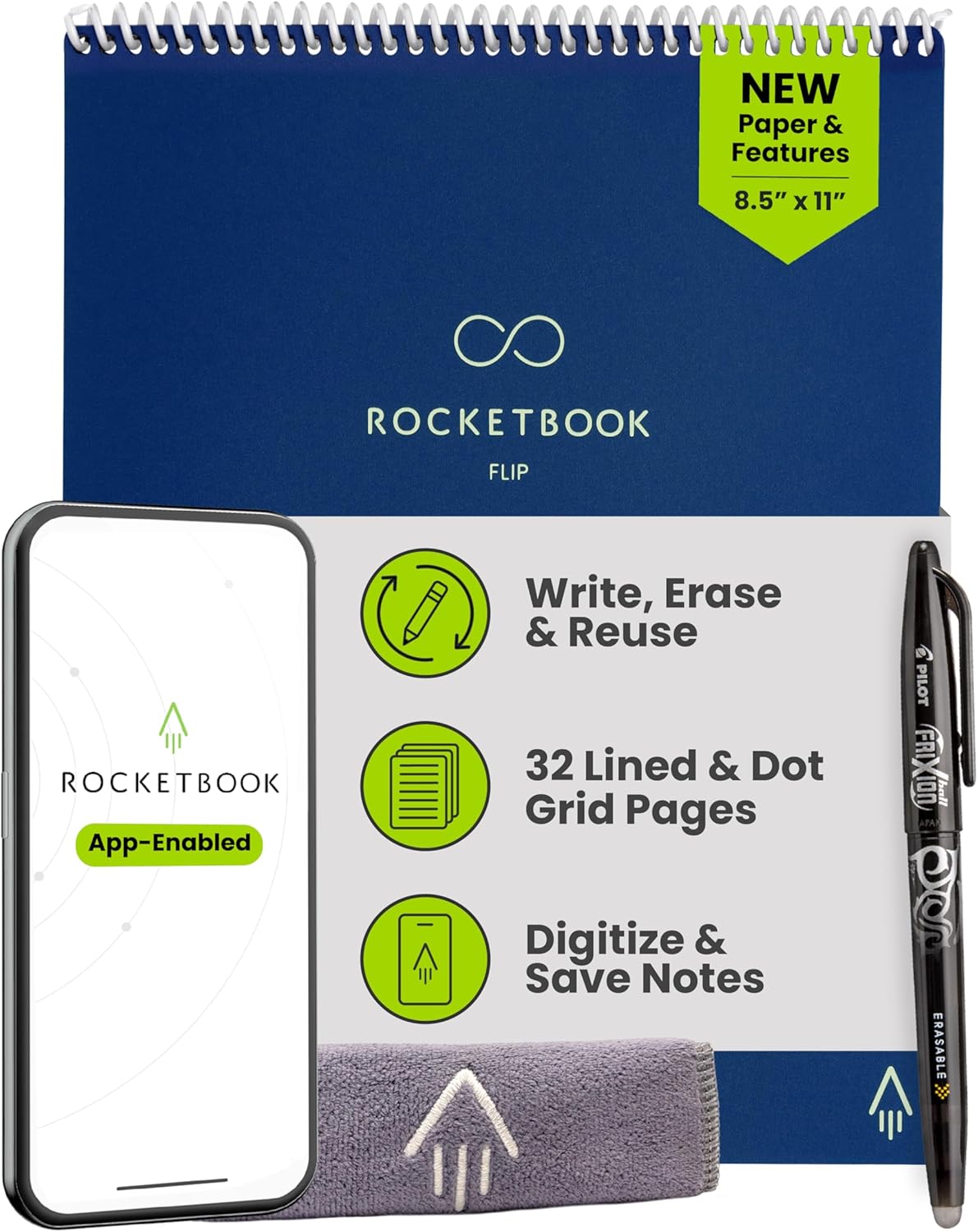
Rocketbook Flip 8.5x11 Reusable Notepad
Rocketbook Flip pairs a letter size spiral notepad with reusable pages that can be wiped clean and scanned through the Rocketbook app. The included pen, lined front pages, and dotted back pages support everyday notes, lists, and big ideas.
Pros
- Reusable pages can be wiped clean with water and a towel
- Rocketbook app scans pages and sends notes to cloud services
- Top bound spiral layout is designed for left handed and right handed users
- Lined front pages and dotted back pages support notes and planning
- Scratch resistant cover and premium reusable paper improve durability
Cons
- The notepad has 32 reusable pages in a letter size format
- Full digitization depends on the Rocketbook app and included pen
- Wiping pages requires water and a towel, not a quick eraser
Rocketbook Mini Reusable Smart Notepad
This pocket-sized, reusable notebook bridges the gap between analog and digital note-taking. It's ideal for frequent list-makers and on-the-go thinkers who want a sustainable, paper-like feel with the convenience of cloud backup.
Pros
- Highly portable and pocket-friendly 3.5 x 5.5-inch size
- Eco-friendly reusable design that reduces paper waste
- Seamless app integration for digitizing and organizing notes to cloud services
- Includes a pen and features durable, waterproof construction
- Dotted pages are versatile for lists, notes, and sketches
Cons
- Requires a separate smartphone app and cloud account for full digital functionality
- The small page size may not be suitable for extensive note-taking
XP-Pen Note Plus CT860B Digital Notebook
This smart notebook digitizes handwriting on real A5 paper, syncing notes wirelessly to your phone. It's designed for students and professionals who want a natural, paper-based workflow with digital backup and organization.
Pros
- Uses real A5 paper for a natural writing feel
- Stable Bluetooth 5.3 syncs notes instantly to mobile devices
- Long 14-hour battery life with fast charging
- Compatible with any standard A5 notebook refill, reducing waste
- Includes offline storage and cloud backup for notes
Cons
- Requires a compatible smartphone (Android 10.0+/iOS 14.0+)
- No electronic screen, relying on paper and pen only
reMarkable Paper Pro RM81C 11.8 Color Tablet
A color e ink tablet centered on a 11.8 inch canvas display and the included Marker Plus pen, aimed at note takers, readers, and sketchers who want a paper-like feel. The low-glare screen, adjustable reading light, and long battery rating make it practical for focused work, while some organization and cloud tools require a separate Connect subscription.
Pros
- 11.8 inch color Canvas display with 2160 x 1620 resolution supports color writing, sketching, and reading
- Marker Plus with an eraser and six spare tips is included for a paper-like writing experience
- Low-glare display and adjustable reading light support outdoor and night reading
- Battery life is rated up to 15 days on a single charge, with fast 0 to 90 percent recharge
- Folders, tags, PDF annotation, and handwriting to typed text conversion help organize notes
Cons
- Connect subscription is sold separately for unlimited cloud storage, handwritten note search, and app sharing
- The device is a focused notebook rather than a general-purpose tablet
- Only one USB port is listed for charging and data
Huion Note X10 2-in-1 Digital Notebook
Huion Note X10 combines a real A5 notepad with a digital pen that captures handwriting as vector notes in the Huion app. It also switches to a 7-inch graphics tablet mode for PC, making it useful for note-taking, sketching, and meeting records.
Pros
- Handwriting is captured digitally while writing on real paper
- Audio sync and playback help match notes to what was said
- Switches to a 7-inch graphics tablet mode with the included panel
- Bluetooth 5.0 pairing and 18-hour battery life
- Notes can be merged, split, grouped, highlighted, and shared as images, PDF, or MP4
Cons
- Needs the Huion Note app and Bluetooth pairing for digital capture
- Only 50 pages included, so refills may be needed for long-term note taking
- No screen on the tablet surface
iFLYTEK AINOTE Air 2 E Ink Tablet with AI
This 8.2-inch E Ink tablet is designed for professionals who need to capture and organize meetings. It stands out with AI-powered meeting summaries and real-time transcription, aiming to streamline workflow from note-taking to action. Its lightweight, paper-like display makes it a focused alternative to conventional tablets.
Pros
- Powerful AI features for meeting transcription and automatic summaries.
- Paper-like E Ink display with 4096-level pressure sensitivity for natural writing.
- Supports multilingual voice transcription and handwriting-to-text conversion.
- Ultra-portable and lightweight design at 8.1 ounces.
- Eye-friendly reading with adjustable warm and cool front lights.
Cons
- E Ink display can feel less fluid during page turns compared to LCD tablets.
- Voice transcription and handwriting-to-text conversion cannot run simultaneously.
- Moderate user rating of 3.7 stars suggests some mixed experiences.
How We Picked
Our selection for the best smart notebooks of 2026 is based on a detailed analysis of product specifications, aggregated user ratings, and extensive feedback from real-world users. We prioritized objective criteria to ensure our list highlights models that deliver on their core promises. We did not physically test these products; our methodology focuses on transparently comparing documented features and verified consumer experiences.
- Writing & Syncing Method: Whether it uses reusable paper with a companion app or is a full digital tablet.
- Cloud Integration & App Features: The ease of digitizing notes and compatibility with popular services.
- Design & Portability: Size, build quality, and suitability for daily carry.
- Specialized Functionality: Unique features like AI summarization, audio recording, or multi-language support.
- Eco-Friendliness & Long-Term Value: Reusability and reduction of paper waste.
Buying Guide: Making Sense of Best Smart Notebooks
Core Technology: Reusable Paper vs. Digital Tablet
The fundamental split in this category is between reusable paper notebooks and dedicated digital tablets. Reusable paper models, like the Rocketbook Multi-Subject Reusable Smart Notebook, offer the authentic feel of pen on paper. You write with a special pen, scan pages with your phone’s app, and then wipe the page clean. Digital tablets provide a screen that mimics paper, storing notes directly on the device. Your choice depends on whether you prefer a tactile experience tied to your phone or a standalone digital device.
App Ecosystem and Cloud Sync
The companion app is the brain of any smart notebook. Evaluate its ability to accurately scan handwritten pages, organize them with tags or folders, and sync seamlessly to your preferred cloud storage (Google Drive, Dropbox, OneNote). Look for features like Smart Titles that convert handwriting to searchable text. A robust app turns a notebook from a passive tool into an active part of your digital workflow. For more on tech that integrates into your daily life, see our guide on travel essentials.
Specialized Features for Your Needs
Beyond basic note-taking, many models offer specialized tools. Some feature built-in audio recording that syncs with your notes, perfect for students or meeting attendees. Others, like certain digital tablets, include AI-powered features such as meeting summarization or handwriting-to-text conversion in multiple languages. Consider if you need a simple note digitizer or a comprehensive productivity assistant that handles transcription and organization.
Quick Checklist
- Determine your preferred writing surface: physical reusable paper or a digital screen.
- Verify the companion app’s compatibility with your smartphone’s OS and your go-to cloud services.
- Assess the battery life (for digital tablets) or the need for special pens/microwaving (for reusable paper).
- Check for any required subscriptions for advanced features like cloud storage or AI tools.
- Consider the physical size and weight for your daily carry, whether in a bag or pocket.
Related reading: Explore other specialized gear for hobbies and professions.
FAQs
What is the best smart notebooks in 2026?
Our top recommendation balances versatility, ease of use, and value. It effectively bridges the gap between analog writing and digital organization, making it suitable for the widest range of users, from students to professionals. For specific needs like ultra-portability or advanced digital features, other picks on our list may be a better fit.
Do I need a special pen to use a smart notebook?
It depends on the type. Most reusable paper notebooks require a Pilot FriXion pen or similar erasable ink pen, which is often included. Dedicated digital tablets come with or require a specific stylus designed for their screen. Always check what’s included in the box. The XPPen Note Plus Digital Notebook with Pen Syncs, for example, uses a dedicated ink pen that works on real paper.
How do I get my notes from the notebook to my computer?
Notes are typically transferred via a companion smartphone app. You scan the page with your phone’s camera, and the app uploads the image or converted text to a linked cloud service like Google Drive or Dropbox. From there, you can access the files on any device, including your computer. Some digital tablets can sync directly over Wi-Fi. For more on connected devices, browse our headphones section.
Are smart notebooks truly eco-friendly?
Reusable paper notebooks significantly reduce paper waste by allowing you to erase and reuse pages hundreds of times. Digital tablets eliminate paper use entirely after manufacture. Both options are more sustainable than constantly buying and discarding traditional paper notebooks, making them a greener choice for frequent note-takers.
Can I use a smart notebook without a smartphone?
Digital tablets function as standalone devices for writing and storing notes. However, to back up, organize, or share those notes, you will eventually need to connect to a smartphone, tablet, or computer via their respective apps or software. Reusable paper notebooks absolutely require a smartphone with the companion app to digitize your notes.
What happens if I lose the notebook or it breaks?
This highlights the importance of regular cloud sync. If your notes are backed up to a service like Google Drive, you can access them from any device even if the physical notebook is lost. For digital tablets, check the manufacturer’s warranty for repair or replacement policies. It’s a good practice to sync your work frequently, similar to how you’d manage other important digital files and media.
Final Thoughts
The ideal smart notebook seamlessly integrates into your existing habits. For users who need a central hub for planning, lists, and notes, the Rocketbook Fusion Reusable Undated Productivity is unmatched in its versatility. If your priority is a premium, distraction-free digital writing experience on a color E Ink display, the reMarkable Paper Pro Digital Notebook with Marker is the clear choice. And for those who need a tiny, always-available notepad for capturing ideas on the go, the Rocketbook Mini Reusable Smart Notepad offers incredible convenience. Whichever model you choose, take a moment to set up the companion app and cloud sync immediately. This ensures your notes are safe, searchable, and truly become a part of your digital life. For further insights into tech that enhances daily tasks, explore our other in-depth reviews and guides.
About the author
Editor, Cameras. Mei covers mirrorless, compact and action cameras. She compares sensor size, autofocus, video specs, lens ecosystems and battery life, and says which kind of shooter each camera suits.