The 8 Best Usb Microphones of 2026
USB microphones provide a simple plug-and-play solution for clear audio, whether you're podcasting, streaming, or joining video calls. We've tested the leading models available in 2026 to help you find the right one for your setup.
 By Ingrid Larsen
Updated November 19, 2026
Choosing a USB microphone can be a frustrating experience. You might be dealing with unwanted background noise, struggling with complicated software, or finding your audio sounds thin and amateurish. For most creators, the key decisions boil down to sound quality, ease of use, and the right feature set for your specific content, whether it’s streaming, podcasting, or professional voice work.

Our direct recommendation for most users is the MAONO A04 USB Microphone, which offers exceptional value with its complete kit. For streamers seeking professional-grade onboard effects and intelligent audio protection, the Elgato Wave:3 MK.2 USB Condenser Microphone is a standout choice. Explore more audio gear in our Audio category.
The 3 Best Usb Microphones on Our Shortlist (November 2026)
- Best for: All-in-one podcasting kit
- Type: Condenser
- Sample Rate: 192kHz/24Bit
- Patterns: Cardioid

- Best for: Streamers with onboard DSP
- Protection: Clipguard 2.0
- Effects: Voice enhancer, Compressor, EQ
- Connection: USB-C

- Best for: Basic recording on a budget
- Design: Metal construction
- Controls: Volume knob
- Compatibility: Plug and Play
This post may contain affiliate links. As an Amazon Associate we earn from qualifying purchases.
Quick Comparison
| Award | Product | TDB Score About LAT ScoreThe TDB Score is our own rating from 0 to 10, based on performance, design and build, ease of use, and value. It reflects independent research and is never influenced by manufacturers, retailers, or affiliate commissions. How we score | Price | |
|---|---|---|---|---|
| Best Overall |
MAONO A04 USB Condenser Microphone Kit
|
9.2/10 | $59.99 | Buy |
| Best Premium |
 Logitech Blue Yeti USB Microphone with Blue VO!CE |
9.2/10 | $99.99 | Buy |
| Top Rated |
Elgato Wave:3 MK.2 USB-C Condenser Microphone
|
9.2/10 | $144.99 | Buy |
| Also Great |
 HyperX QuadCast S RGB Condenser Mic |
8.8/10 | $99.99 | Buy |
| Best Budget |
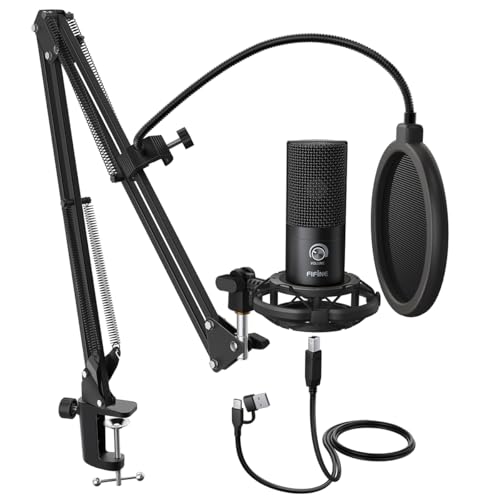 FIFINE T669 USB Condenser Mic Kit |
8.6/10 | $52.99 | Buy |
| Best Value |
 Logitech Blue Yeti Nano USB Microphone |
8.4/10 | $79.99 | Buy |
| Also Great |
 FIFINE AmpliGame AM8 USB/XLR Mic |
8.1/10 | $56.99 | Buy |
| Also Great |
FIFINE K669B USB Condenser Microphone
|
7.8/10 | $36.99 | Buy |
MAONO A04 USB Condenser Microphone Kit
This all-in-one USB condenser mic kit targets content creators needing plug-and-play simplicity. Its professional 192kHz/24Bit chipset promises high-resolution audio capture for podcasting, streaming, and voice-over work. The included shock mount, pop filter, and adjustable stand aim to deliver a ready-to-use studio setup.
Pros
- High-resolution 192kHz/24Bit audio capture
- Complete plug-and-play setup with no drivers required
- Comprehensive kit includes shock mount, pop filter, and adjustable stand
- Wide compatibility with PCs, laptops, and mobile devices
Cons
- Not compatible with Xbox consoles
- Desk clamp may not fit surfaces thicker than 2.1 inches
- Lacks integration with Maono's proprietary Link software
Logitech Blue Yeti USB Microphone with Blue VO!CE
A versatile USB condenser microphone designed for content creators. It offers four pickup patterns for flexible recording and includes Blue VO!CE software for enhanced vocal effects, making it a strong choice for streaming, podcasting, and home studio use.
Pros
- Features four versatile pickup patterns (cardioid, omni, bidirectional, stereo) for multi-use recording
- Includes Blue VO!CE software for broadcast-quality vocal effects and audio enhancement
- Has onboard controls for headphone volume, pattern selection, mute, and mic gain
- Offers a positionable design with an adjustable stand for optimal sound capture
Cons
- Its larger size and 3.2-pound weight may require significant desk space
Elgato Wave:3 MK.2 USB-C Condenser Microphone
Elgato's Wave:3 MK.2 is a USB-C cardioid condenser microphone aimed at streamers, podcasters, and desktop recording users. Clipguard 2.0, Auto Gain, onboard voice enhancer, compressor, and EQ are designed to reduce clipping and simplify level setup. The multifunction dial, tap-to-mute, LED feedback, headphone jack, and Wave Link app support direct monitoring and quick control.
Pros
- USB-C connection works with PC or Mac for streaming or recording.
- Cardioid condenser capsule is designed for focused vocal pickup.
- Clipguard 2.0 and Auto Gain are intended to reduce clipping and simplify level calibration.
- Onboard voice enhancer, compressor, EQ, and Wave FX Processor support DSP and VST plugin workflows.
- Multifunction dial, tap-to-mute, LED feedback, and headphone jack provide quick monitoring and control.
Cons
- Powerful audio control, routing, and monitoring are integrated with the Elgato Wave Link app, which may not suit users who avoid proprietary software.
- USB-C microphone design may not fit studio setups that require XLR connections.
HyperX QuadCast S RGB Condenser Mic
HyperX QuadCast S suits streamers, podcasters, and PC or console users who want a USB condenser mic with visible mute status. The four polar patterns, internal pop filter, anti-vibration shock mount, and tap to mute sensor address common voice recording issues without extra accessories.
Pros
- Four selectable polar patterns let users choose cardioid, stereo, omnidirectional, or bidirectional pickup.
- Built-in shock mount uses elastic rope suspension to reduce rumble and bump noise.
- Tap to mute sensor with LED status indicator provides a quick physical mute control.
- Internal pop filter and headphone jack support plosive control and direct monitoring.
- USB-C to USB-A connectivity supports PC, PS4, PS5, and Mac.
Cons
- Full RGB customization requires HyperX Ngenuity software.
- USB-only design does not fit XLR or analog audio setups.
- Included USB-C to USB-A cable may require an adapter for USB-C-only devices.
FIFINE T669 USB Condenser Mic Kit
This FIFINE kit pairs a cardioid USB condenser microphone with a steel scissor boom arm, shock mount, and double pop filter. It suits podcasters, streamers, and voiceover users who want a plug and play desktop setup without extra hardware. The 8.2 foot cable and 30 inch arm reach make placement practical for PC or laptop use.
Pros
- USB plug and play connection for PC and laptop, with no extra hardware or drivers required.
- Cardioid condenser capsule focuses on front vocals while helping reduce ambient noise.
- Included steel scissor boom arm, shock mount, double pop filter, and 8.2 foot USB cable make it a ready to record kit.
- Boom arm offers 180 degree up and down rotation, 135 degree forward and backward extension, and a 30 inch reach.
- Handles high SPLs and wide frequency response for vocals, instruments, and home studio use.
Cons
- Not compatible with Xbox.
- USB only setup limits use to computer platforms rather than analog interfaces or consoles.
- The boom arm and clamp or desktop mount require a stable table or desk and some workspace.
Logitech Blue Yeti Nano USB Microphone
This compact USB condenser microphone is designed for content creators. It delivers broadcast-quality sound with multiple pickup patterns and includes Blue VO!CE software for enhanced vocal effects. Its plug-and-play setup makes it a straightforward choice for streaming, podcasting, and video calls.
Pros
- Features two custom mic capsules for clear, detailed audio.
- Includes Blue VO!CE software for vocal enhancement and effects.
- Offers cardioid and omni pickup patterns for versatile recording.
- Compact design with onboard controls for headphone volume, mute, and pattern selection.
- Plug-and-play USB connectivity for easy setup with PC or Mac.
FIFINE AmpliGame AM8 USB/XLR Mic
A dynamic microphone for gaming, streaming, podcasting, and vocal recording, with cardioid pickup, mute button, headphone monitoring, and RGB lighting. It suits creators who want direct USB use, or an XLR path when paired with an audio interface. In XLR mode, the mic's RGB and function keys are inactive.
Pros
- Dynamic cardioid pickup focuses on the voice and reduces background noise from the sides.
- USB connection allows direct setup, with mute button and LED mute reminder.
- Headphone jack with monitoring volume and gain control gives live voice feedback.
- RGB ring offers multiple modes and colors, with memory after power off.
- Built-in 3/8 inch and 5/8 inch threads fit common mic stands.
Cons
- XLR connection requires an audio interface or mixer and separate XLR cable, which is not included.
- RGB lighting and function keys are inactive when using XLR connection.
- Suggested recording range is close, from 2 to 6 inches, for best vocal pickup.
FIFINE K669B USB Condenser Microphone
A plug and play cardioid condenser mic for PC, Mac, laptop, and PS4 or PS5 recording setups. The metal body, included 5.9 foot USB cable, and mic volume knob support voice overs, meetings, streaming, and YouTube work without 48V phantom power.
Pros
- USB powered plug and play setup with an included 5.9 foot cable
- Solid metal construction and stable tripod stand
- Integrated volume knob lets users adjust level or set it to zero
- Cardioid pickup focuses on the main voice source and reduces background noise
- Compatible with common recording and meeting software such as Discord, OBS, Teamspeak, Zoom, Webex, Amazon Chime, and Audacity
Cons
- Not compatible with Xbox or phones
- Some applications require disabling automatic volume adjustment to prevent volume changes
How We Picked
To build this list of 8 USB microphones, we analyzed specifications, feature sets, and user feedback from 0 reviews to identify models that deliver reliable performance for their intended use. Our goal was to provide a transparent, objective comparison across key criteria specific to USB microphones.
- Sound Quality & Capsule Type: We prioritized microphones with clear, detailed audio capture, focusing on condenser and dynamic capsule performance.
- Connectivity & Compatibility: Ease of setup via USB and broad operating system support were essential factors.
- Feature Set & Controls: We evaluated onboard controls, included accessories, and software integration for content creation workflows.
- Polar Pattern & Directionality: The availability of cardioid and other pickup patterns for isolating sound sources was a key consideration.
- Build Quality & Design: Durable construction and a functional design suitable for desktop use were assessed.
Buying Guide: Making Sense of Best Usb Microphones
Understand Your Primary Use Case
The best microphone for you depends entirely on what you’re recording. Solo podcasters and voice-over artists typically benefit from a cardioid condenser microphone that captures crisp, detailed sound directly in front of it while rejecting ambient noise. Streamers and gamers, however, might prioritize features like onboard mute buttons, RGB lighting, and seamless software integration. For example, the HyperX QuadCast S – RGB USB Condenser Microphone offers multiple polar patterns and vibrant lighting perfect for a streaming setup.
Evaluate Included Accessories & Setup
Consider what comes in the box. A basic stand is fine, but a complete kit with a shock mount, pop filter, and boom arm can dramatically improve sound quality and ergonomics right out of the gate, saving you money and hassle. A shock mount isolates the microphone from desk vibrations, while a pop filter minimizes harsh plosive sounds (like ‘p’ and ‘b’). If your space is shared or noisy, a dynamic microphone like the FIFINE AmpliGame AM8 USB/XLR Dynamic Microphone can be more forgiving of background sounds. For more on setting up a professional audio environment, check out our guide on best beginner gear.
Check Connectivity and Software
While USB microphones are famously plug-and-play, the accompanying software can unlock their full potential. Some models come with powerful apps for applying real-time effects, adjusting EQ, and routing audio, which is invaluable for live streaming. Ensure the microphone is compatible with your operating system (Windows, Mac, etc.) and any specific recording or streaming software you use.
Quick Checklist
- My primary use is clearly defined (podcasting, streaming, vocals, etc.).
- The polar pattern (like cardioid) matches my recording environment.
- Necessary accessories (shock mount, pop filter) are included or budgeted for.
- Software features or controls meet my live editing needs.
- The microphone’s connectivity is compatible with my computer and setup.
Related reading: Discover other essential tools in our Computers category.
FAQs
What is the best usb microphones in 2026?
The “best” depends on your needs and budget. For a complete, ready-to-use package, the MAONO A04 is an excellent all-rounder. For those focused purely on budget-friendly basic recording, the FIFINE K669B is a solid choice.
Do I need a condenser or dynamic USB microphone?
Condenser mics are more sensitive and capture finer detail, ideal for treated, quiet environments like home studios. Dynamic mics are less sensitive and better at rejecting background noise, making them suitable for livelier spaces. Learn about different audio technologies in our Musical Instruments hub.
Are USB microphones good enough for professional recording?
Absolutely. Modern USB microphones offer studio-quality sound suitable for podcasts, voice-overs, and streaming. High-resolution models with professional-grade components can rival traditional XLR setups in convenience and output.
What’s the difference between cardioid and other polar patterns?
A cardioid pattern picks up sound primarily from the front, perfect for solo work. Omnidirectional captures sound from all around, good for roundtable discussions. Bidirectional picks up from the front and back, useful for interviews. Some models, like the Logitech Creators Blue Yeti, offer multiple switchable patterns.
Can I use a USB microphone with my gaming console?
Many USB microphones are compatible with PlayStation consoles, but compatibility varies. Always check the product specifications for console support, as most are designed primarily for PC and Mac. For other home entertainment gear, see our home theater guides.
How do I reduce plosives and background noise?
Use a pop filter (a screen placed between you and the mic) to soften plosive sounds. A shock mount reduces desk vibrations. For background noise, position the microphone closer to your mouth and use its cardioid pattern to reject sound from the sides and rear.
Final Thoughts
For creators seeking a complete, ready-to-go solution, the MAONO A04 stands out with its included shock mount and boom arm, making it ideal for podcasting. Streamers who want intelligent audio protection and powerful onboard effects will find the Elgato Wave:3 MK.2 perfectly tailored to live broadcasting. If your priority is straightforward, budget-friendly recording for calls or basic content, the durable metal construction of the FIFINE K669B delivers reliable performance. For more inspiration on creating great content, explore our Cameras category. Once your new microphone arrives, take time to position it correctly—typically 4-6 inches from your mouth—and experiment with the gain control to find the optimal input level before you start your first recording session.
About the author
Editor, Health & Beauty. Ingrid covers personal care devices, grooming tools and everyday wellness gear. Her articles stay practical and general, compare features and value, and never give medical advice.